
Overview: About Stanford's Chart of Accounts
Stanford is a complex organization consisting of many different lines of business; including graduate and undergraduate education, research programs, capital projects, investments, athletic programs, residential housing, dining services, and many more. Stanford's accounting structure, "chart of accounts", must reflect these complexities in order to meet the requirements for tracking revenue and expenses, for accurate analysis and decision making, and for reporting to government agencies, sponsors, and donors.
All employees need to have a basic understanding of Stanford's chart of accounts because all financial transactions and activities (i.e. buying and paying for things, getting reimbursed for business and travel expenses, managing funds, etc.) utilize this accounting structure.
On this page:
- Chart of Accounts Defined
- Chart of Accounts and the Oracle Financial System
- Stanford's Chart of Accounts Structure
- Coding Transactions
- Requesting New PTAs, Expenditure Types or Object Codes
Chart of Accounts Defined
The Chart of Accounts is a set of codes used to classify and record financial transactions in meaningful ways. Stanford's Chart of Accounts structure was designed to:
- Identify specific "pots" of money
- Specify what that money may be used for; and
- Record the transactions related to that money
The Chart of Accounts enables financial reporting and provides a framework for understanding the financial results of Stanford's operations. The segments of the Chart of Accounts (for example Project or Task in the PTAEO account structure outlined below) and their descriptive attributes facilitate how the University organizes financial information for:
- Internal reporting and financial management
- External reporting and compliance
- Effective management of restricted funds

Chart of Accounts and the Oracle Financial System
The Chart of Accounts is the foundational data structure that controls how financial transactions and balances are collected and stored in the Oracle Financials system. Oracle Financials contains two inter-related accounting modules, Grants Accounting (GA) and General Ledger (GL). Expenditure type transactions are recorded using Oracle iProcurement [link to About iProcurement in the Resource Center], iOU [link to About iOU in the Resource Center], PCard [link to About PCard in the Resource Center], iJournal [link to About iJournal in the Resource Center], and Labor Distribution [link to About Labor Distribution in the Resource Center]. The detail behind expenditure transactions is recorded in the Grants Accounting module prior to being summarized and posted to the General Ledger module. All University expenses are posted in Grants Accounting, not just those related to grants. The final repository of all financial transactions and balances (i.e. revenue, assets, liabilities, and fund balances) is the General Ledger module. Financial information from the Grants Accounting and General Ledger modules is available for analysis using ReportMart3, the Oracle Financials Reporting tool.
Stanford's Chart of Accounts Structure
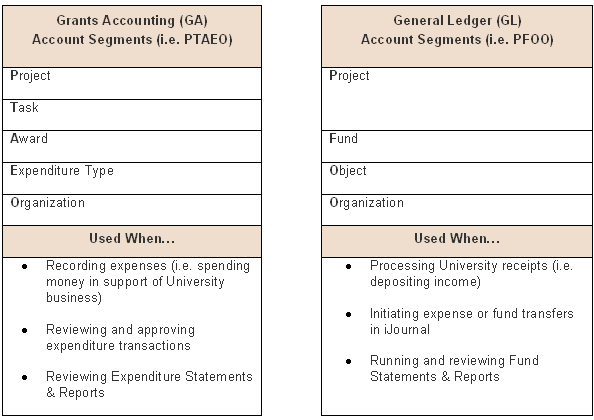
See PTAEO and PFOO Defined for a detailed explanation of Stanford's Chart of Account segments and their definition.
For a text version of the above graphic describing the Grants Accounting (i.e. PTAEO) and General Ledger (i.e. PFOO) account structure, click here.
Coding Transactions
When entering expenditure transactions in Oracle Financials (e.g. purchase requisitions, reimbursements, PCard verifications, etc.), initiating expense or fund transfers in iJournal, or depositing revenue at the Cashiers Office; you will be required to code transactions with the correct PTAEO or PFOO account segments.
There are many Projects, Tasks, and Awards (i.e. Funds) used at Stanford. Some funds are restricted and can only be used for certain types of activities. Other funds are designated for a particular purpose and must be tracked as such. Expenditure Types and Object Codes help track money coming in and out of a fund and help to determine whether or not a fund is being used appropriately. Understand the rules and restrictions related to the funds you use in order to accurately record revenue and expenditures transactions.
The following resources are available to help you properly code transactions:
- Quick Steps: Identify Existing Project, Task, Award (PTA)
- Expenditure Type Query [link]
- Expenditure Type Definitions & Rules [link]
- Object Code Listing [link]
Requesting New PTAs, Expenditure Types or Object Codes
If you find that an existing PTAEO or PFOO account combination does not meet your needs, the following Quick Steps are available to help you initiate your request:
- Request New PTA
- Request Change to Existing PTA (including changes to PTA attributes)
- Request New Expenditure Type or Object Code